Will I get paid for my accounts receivable when I sell?
Sometimes. In small sales the owner often keeps the unpaid invoices. In bigger ones the buyer pays for them at a discount. Here's how to protect that money.
November 15, 2026
By Remi Taffin · November 14, 2026
A data room is a controlled workspace for sharing confidential business records with approved parties during a sale, financing or merger diligence. A typical deal can involve thousands of files and many participants, so the room must keep materials organized and access controlled.
An owner may be deep into running a service business when a broker asks whether a sale is worth exploring. The schedule is full, but the records may sit across accounting software, email and paper files. A broker, a buyer’s accountant and the owner’s attorney need a reliable way to review the same information without giving everyone unrestricted access.
The room serves two purposes: it helps coordinate disclosure, and it reveals how well the business is documented. Missing records, inconsistent figures or unclear file names can raise questions before a buyer even asks them. Preparing the room is therefore an early readiness test, not just a filing task.
A plumber in his late fifties calls a broker before he’s decided anything at all. The business isn’t listed, his office manager doesn’t know, and no letter of intent exists. The broker’s first request is the one nearly every adviser makes: put your records into a data room so we can see what you have.
Here’s the image that makes the term click.
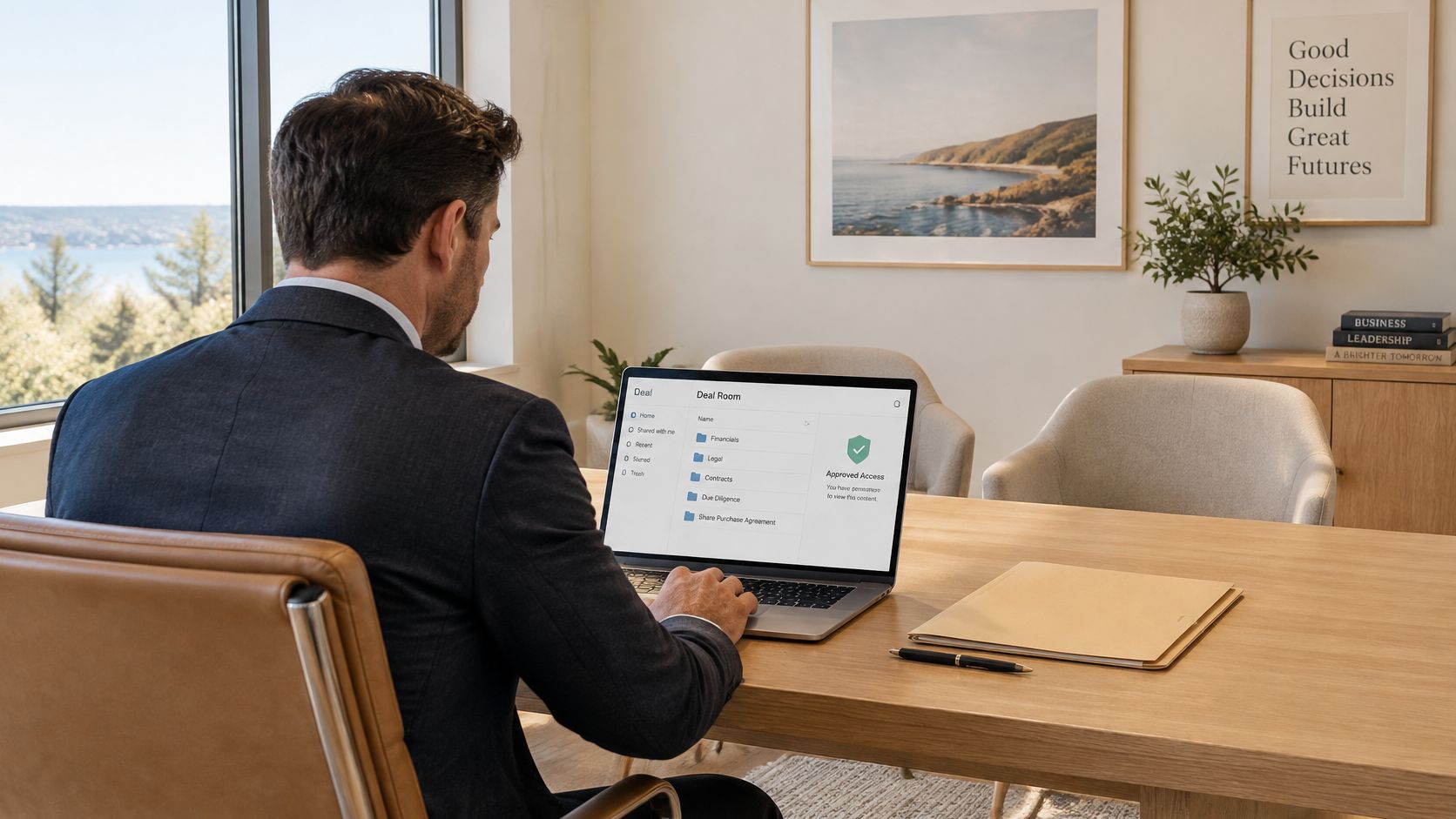
Think of the locked, supervised filing room at a law firm. A visitor signs in at the front desk, a clerk walks them to the drawers they’re cleared to open, they read with someone nearby, and any copy request goes through staff. Nothing is opened and nothing leaves without a record. A data room is that room rebuilt online, where a seller shares confidential records with approved parties during a sale, financing or merger diligence. The drawers become folders, the clerk becomes software, and the sign-in sheet becomes a log participants can’t edit.
A shared folder is built for convenience. A data room is built for accountability, and the difference shows up in five places.
Three situations bring people here. The most common is a sale of the company to an outside buyer. The second is a capital event: bringing in an investor, refinancing with a lender, or adding a partner who needs to see the books. The third is succession, where a family member or key employee needs the same records a stranger would, sometimes with more patience and less paperwork.
An HVAC owner with two decades of history is the classic case. Job files sit in a field-service system, invoices in accounting software, contracts in a cabinet, and a decade of payroll with a provider that mails PDFs on request. The room gives his broker, the buyer’s accountant and his attorney one current set of files, without any of them receiving everything at once.
What it isn’t: a public listing, a substitute for legal advice, or a space that’s private by default. Privacy comes from the settings you choose and the documents you decide to release.
By the end of a first conversation with a broker, you should be able to say it in one line: the data room is the single, permission-controlled place where a buyer tests what you’ve claimed about your business.
The room used to be a room in the literal sense. Buyers and their advisers traveled to a designated location, reviewed paper under supervision, and relied on staff to note who came and went. One space and one set of business hours meant the attorney, the accountant and the operations lead took turns rather than working together, and every corrected document had to be reprinted and refiled by hand.
The two models differ in ways that affect how fast a deal moves.
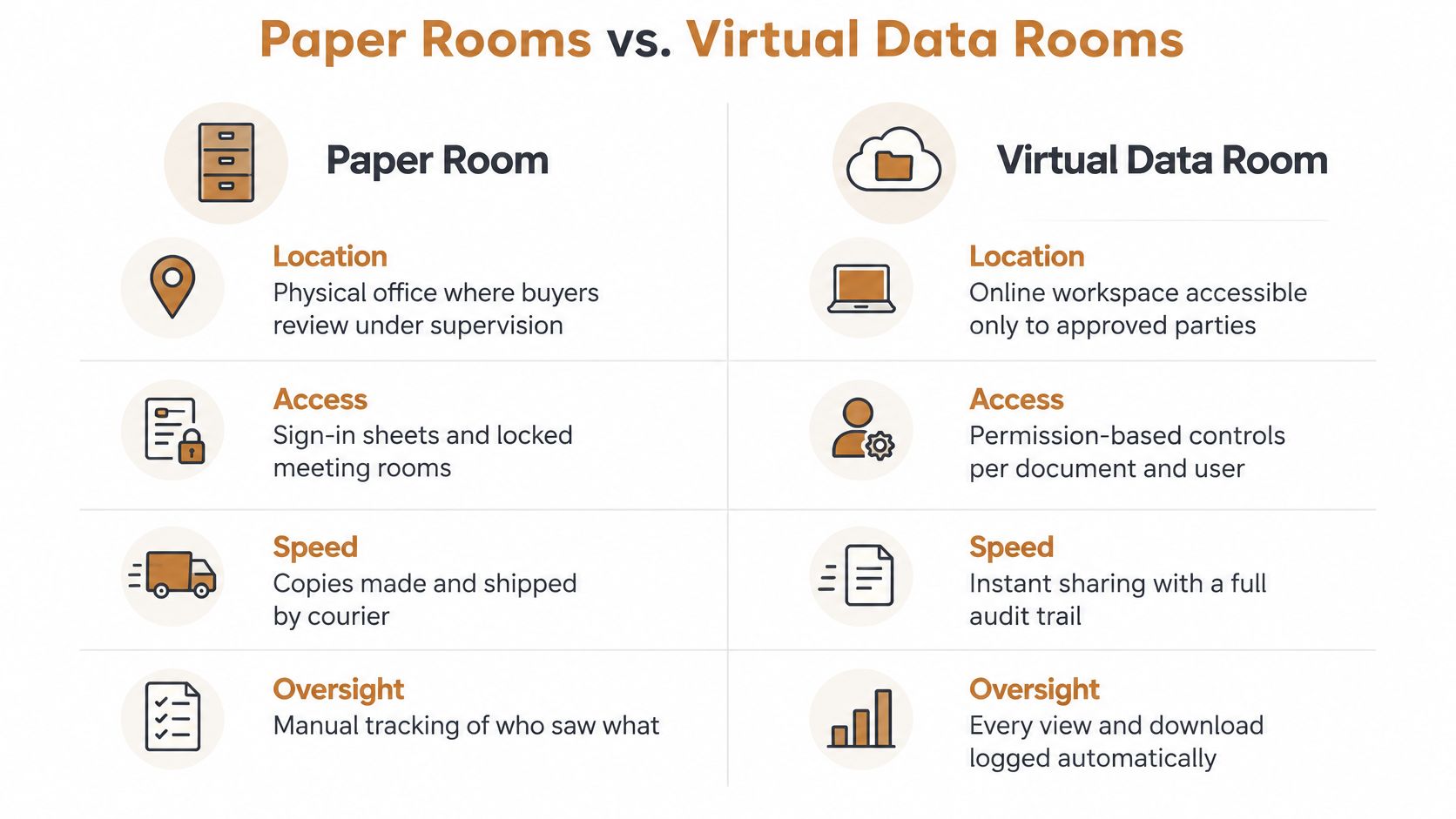
Moving the room online changed what a seller can do with it. Authorized users log in from anywhere, several advisers read the same file simultaneously, an updated document replaces the old version in place, and an audit log takes over from the staff member with a clipboard.
The comparison below, drawn from Intralinks’ guide to dealmaking strategies, sets the two models side by side.
| Feature | Physical room | Virtual data room |
|---|---|---|
| Access | Buyers travel to a designated location | Authorized users log in from anywhere |
| Simultaneous review | Limited by one room and set hours | Many advisers review at the same time |
| Document updates | Reprinted and refiled by hand | Files replaced in place |
| Activity record | Staff note who visited | Audit logs show user, file and time |
| Typical participants | About 152 a decade ago | About 250 on average today |
| Typical file count | Binders and boxes, tallied by hand | About 7,500 files |
The spend has followed the same direction: the global virtual data room market was valued at USD 2.4 billion in 2024, according to Grand View Research.
For an owner selling a service company, the practical change is that the room becomes the evidence base. Buyers use it to test reported earnings, assets, risks and whether the business transfers cleanly, and several advisers can work from current information without the company being advertised or the full file set going out indiscriminately.
Whichever platform you choose, confirm three things before the first buyer logs in: view-only access on sensitive folders, downloads switched off where they aren’t needed, and an activity report you can export.
If you’ve never sat inside one, a short walkthrough of the participant view is worth four minutes.
A buyer opens the room to answer a sequence of questions: Do the earnings hold up? Can key contracts transfer? What risks or costs might come with the business? Organize files so the evidence behind each answer is easy to follow.
| Category | Typical contents | What buyers test |
|---|---|---|
| Financial statements | Profit and loss statements, balance sheets, add-back schedules | Whether reported earnings hold up |
| Tax records | Income and sales tax returns, payroll tax filings | Whether tax records align with financial statements |
| Contracts and leases | Customer agreements, maintenance contracts, vendor terms, property and equipment leases | Transferability and recurring revenue |
| Employee information | Roster, licenses and certifications, key-person agreements | Retention risk and compliance |
| Customer and supplier data | Customer list, revenue by customer, supplier terms | Customer concentration and revenue quality |
| Operations | Job-costing reports, fleet and equipment lists, insurance certificates | Operating performance and insurable risk |
| Legal matters | Claims, litigation history, permits | Potential liabilities |
| Intellectual property | Trademarks, trade names, licenses | Ownership of brand and process assets |
Buyers often begin with financial statements and tax records because those documents set a baseline for the rest of the review. If an add-back schedule presents earnings that the returns do not support, the buyer may question the reliability of other records, too. Keep each adjustment traceable to its supporting ledger entry.
Contracts help buyers assess how revenue may continue after a sale. A maintenance agreement with recurring work and clear transfer terms tells a different story from a record of one-off jobs. Revenue by customer shows whether a large share depends on a few accounts, a concentration risk buyers may factor into their offer.
Generic checklists can miss records that explain how a trades or commercial service company earns and delivers its revenue. Buyers may ask for:
Index files by name, date range, owner and status. Mark each item complete, partial or missing. If a document does not exist, include a brief explanation and, where applicable, when it can be produced. A clear gap is easier to assess than an unexplained absence.
For the financial records, use this financial due diligence checklist for preparing buyer-ready files. Organize supporting documents so a buyer can trace a figure from the summary to its source. Then ask your attorney or accountant to confirm the requirements for your transaction and state.
A buyer asks for customer-level revenue during the first review. You can share the shape of the business without revealing names: disclose customer types and revenue bands now, then release identifying details only when the process reaches an appropriate stage. A data room works like a locked filing room with a supervisor: security controls the door, while you decide which folders open and when.
| Stage | What to share | What to hold back |
|---|---|---|
| Teaser stage | Business overview, anonymized financial summary | Names, customer list, employee pay |
| Diligence stage | Financial statements, contracts and operating records with redactions | Personal identifiers, pricing formulas until buyer commitment is strong |
| Closing stage | Final schedules, consents, transfer documents | Anything beyond what closing requires |
Encryption protects files from outsiders, but it does not decide what a buyer should see. Before sharing a file, consider whether to redact it, summarize it, make it view-only, delay it or leave it out. Guidance in Brodies’ guide to data rooms recommends limiting disclosure to what is necessary, using nondisclosure agreements, and withholding especially sensitive documents until later in the transaction.
If the deal collapsed tomorrow, could this document damage the business or a person in it? If yes, redact it, summarize it, make it view-only, delay it or leave it out.
Customer names, route density, pricing structure, employee pay and vendor terms can reveal how the business competes. Staging these materials is a way to control disclosure, and a readiness test: if you cannot separate sensitive details from the information a buyer needs, the file may need more preparation.
For example, a landscaping company could show customer revenue as categories and bands: “municipal contracts, 30 to 40% of revenue; two regional property managers, 25%.” The buyer sees how revenue is distributed without receiving names, addresses or contract values. Named customers can be released after a nondisclosure agreement is signed and a letter of intent is in place; pricing sheets may still remain view-only.
Get a confidentiality agreement signed before opening a sensitive stage, and ask your attorney to review the agreement and redactions. The business sale confidentiality agreement guide explains what the agreement should cover.
A data room works like a locked filing room with a supervisor at the door: each participant should see only the files their role requires. This least-privilege approach limits exposure if an account is compromised or access is granted by mistake. A permission map can make the boundaries clear:
Give each participant an individual login, not a shared departmental account. Revoke access when a buyer leaves the process. The permissions themselves also test readiness: if it is difficult to decide which files belong to which role, the records or disclosure plan may need more work.
An activity log should identify who took what action, and when. The linked audit logging guidance describes records that capture timestamps, user identifiers, event descriptions, file names and the access rules invoked. Protect the logs from editing and deletion, and limit administration to a small number of people.
For example, if a buyer’s associate opens a payroll summary late on a Tuesday and downloads it, the log should show the account, file, time and action. That record helps confirm what the buyer reviewed, spot accidental over-sharing and reconstruct diligence activity if questions arise after closing. Clear evidence trails for confidential casework likewise depend on being able to show who accessed what.
Treat activity logs as sensitive because they reveal file names and the rhythm of the deal. Before revoking access, export the activity report. Check view-only settings, watermarks and disabled downloads on sensitive folders.
A buyer asks for the latest profit and loss statement, then wants to understand why it differs from the tax return. If the records are scattered across accounting software, email, payroll, field-service systems, paper files and personal drives, even a simple question can take days to answer. Preparing a data room reveals those gaps before they become delays in a sale. The room is both a controlled disclosure tool and an early test of how ready the business is for scrutiny.
Start with an inventory, not a folder makeover. List each record category, where the original document lives and whether it is complete. Then create an index with a status for each item: complete, partial or missing. That index gives a broker or buyer a map of what is available without implying that a missing file exists.
For every gap, write a brief explanation of why the record is unavailable and when it can be produced. Never backdate a signature or present a reconstructed schedule as an original. If figures disagree, such as add-backs that do not tie to a tax return, resolve the explanation before uploading the files. A clear account of a gap is easier to assess than a tidy-looking room that conceals one.
Keep the preparation steps practical:
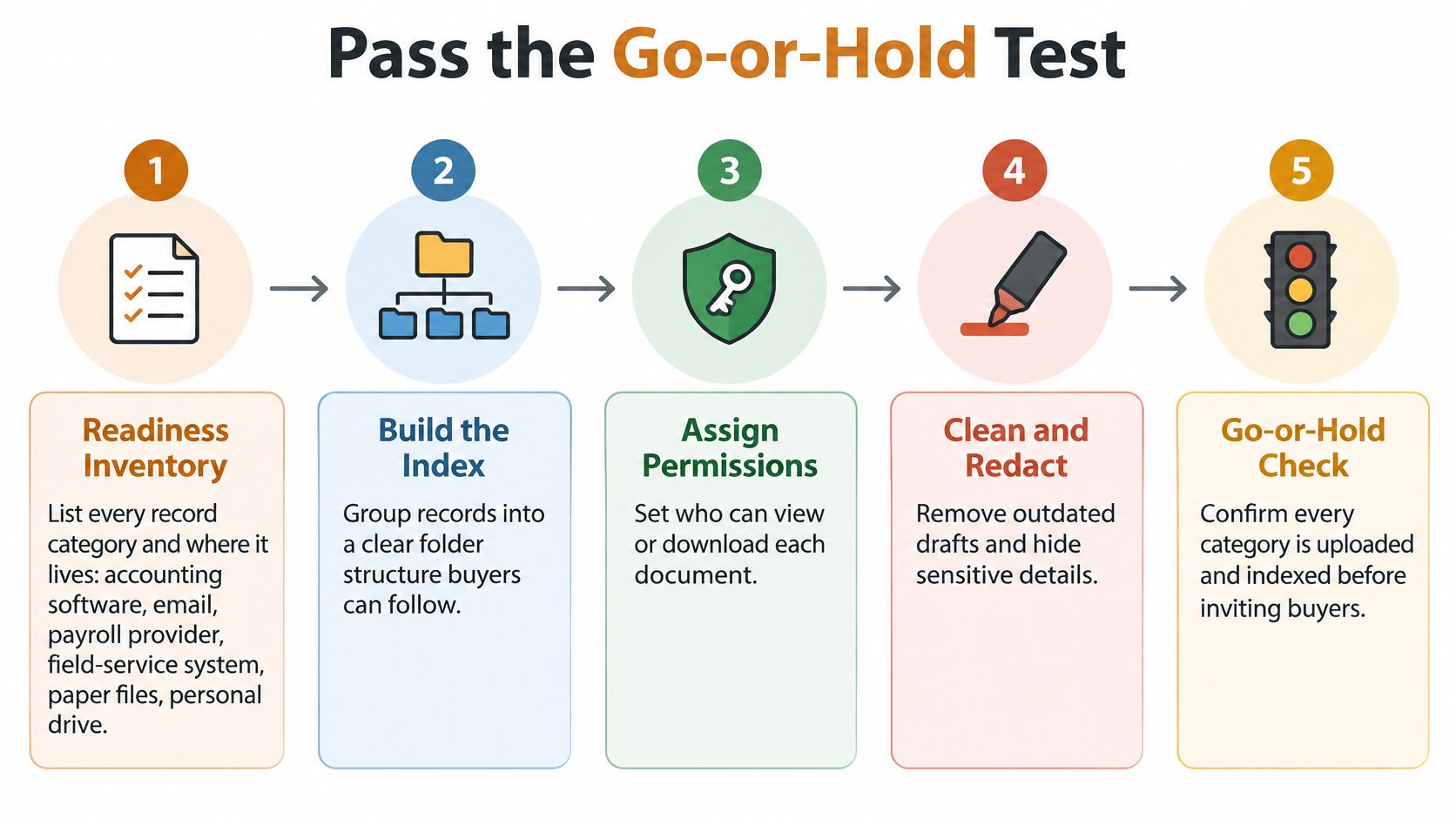
Before opening the room, confirm that the index is complete or every gap is explained, access is set by role, a signed NDA is on file, and sensitive files are redacted or staged for later disclosure. Test that the activity report can be exported. These checks make the room a supervised filing space: buyers receive the material appropriate to their stage, while the owner can see whether the business is ready to answer follow-up questions.
Go or hold: If one of those conditions is missing, wait before granting access. A gap discovered late can delay the next steps in a sale. The average time from opening a data room to announcing a deal rose from about 124 days a decade ago to 203 days, a 64% increase. Deals completed from 2020 through 2022 averaged 247 days in diligence, according to the same analysis. A missing record found during a long process can hold up the questions and decisions that depend on it. See what happens during due diligence to understand how buyers work through those questions.
Passing the go-or-hold test is the point where most owners want a second opinion from someone who has sat through this before. The Owner’s Shortlist is a free service for owners of established service businesses, described as “The modern Rolodex.” Owners never pay, specialists pay to be listed, and a real person reviews your business and introduces one specialist whose past deals fit it, most often a business broker.
That single introduction is deliberate. Instead of a directory of names to interview, you get one broker chosen on industry, business size and how past clients felt after closing. If the first fit is wrong, another introduction follows at no cost and no obligation. Most brokers on the list have 25 to 50 years of experience selling businesses, and your information goes only to the specialist you’re introduced to, so the business is never advertised.
An HVAC company owner in Florida with 28 years in business said he had talked to three advisors before finding a Shortlist specialist who understood what he had built, and it took one conversation.
Nothing on the site is legal, tax or financial advice. Questions about your NDA belong with an attorney, and questions about how a sale is taxed belong with a CPA.
When you’re ready to compare your records against what buyers ask for, The Owner’s Shortlist can put a person on it rather than a directory: one introduction to a specialist who has sold businesses like yours, at no cost to you, with no obligation to move forward. Start by filling out the short form at The Owner’s Shortlist and describing what you’ve built. A real person reviews it before anyone’s name reaches you.
Who wrote this: The Owner's Shortlist is not a broker and doesn't sell businesses. We get paid the same no matter which specialist we introduce you to. More about how we work.
Tell us your situation. We'll connect you with a specialist who works with owners like you. One conversation, no sales pressure.
Found this useful?
Add The Owner's Shortlist as a preferred source and get our articles highlighted in Google Search results.
Add to Preferred SourcesSometimes. In small sales the owner often keeps the unpaid invoices. In bigger ones the buyer pays for them at a discount. Here's how to protect that money.
November 15, 2026
Your business name usually sells with the business. It only stays on the trucks if the contract says so. Here's what buyers do and what to put in writing.
November 15, 2026
What is depreciation recapture when you sell trucks, tools, or a service company, and how the deal changes the tax.
November 12, 2026
Selling a business valuation explained for owners: the methods buyers use, the earnings they price, and how to get a number you can defend.
November 4, 2026